# Modular Routing in React
In a React + React Router environment, routing configuration is a one-to-one mapping between a route and that route's display elements.
Here's a basic example:
```
```
The above approach is suitable for simple applications, but, for complex ones, it's not really ideal.
Complex applications are usually composed of several modules. Each module is then composed of several components. If this is the application's structure, it is just reasonable for the routing model to follow the same structure, right?
Well, that's just what we're going to do! In this post, let's look at implementing modular routing in React.
We're doing this in 3 steps:
1. Setup a theoretical application and identify its modules and components
2. Implement a regular routing model for the said application
3. Transform the regular routing model into a modular one
Let's start!
## The Application, the Modules, and the Components
Let's say we're building a blog-writing application and we have decided to implement the ff. modules:
- Post Management
- Draft Management
Given the above modules, we'll probably design the routing map like this:
| Module | Route |
| ----------- | ----------- |
| Post Management | /posts |
| Draft Management | /drafts |
Looking at the above routings, it seems like we're only going to have 3 components directly representing each of our main modules. But, we all know that these modules are still going to be composed of one or more components.
In fact, we can even argue that these modules are "smaller applications" themselves. For instance, *Post Management* should also have a route navigating to the *Update Post* component. *Draft Management* should have this behavior as well (navigate to the *Update Draft* component).
So, what do we do now? We "push up" the concept of modules and identify the actual components of the application.
Here's the new routing map but with an added *Component* column.
| Module | Component | Route |
| ----------- | ----------- | ----------- |
| Post Management | Post Listing | /posts |
| | Update Post | /posts/:postId |
| Draft Management | Draft Listing | /drafts |
| | Update Draft | /drafts/:draftId |
## The Regular Routing Approach
Now, we have identified the modules and components for our application. Let's go ahead and implement them!
### Create A New React App First
Of course, the first step is to create a brand new React application.
```
npx create-react-app reactjs-module-based-routing
cd reactjs-module-based-routing
```
Then, we'll install the [React Router for Web Applications library](https://reactrouter.com/web/guides/quick-start) since we're building a web application.
```
npm install --save react-router-dom
```
For simplicity, we remove all of the other files under the `/src` directory.
Then, we create a new `index.js` file:
```
import React from 'react';
import ReactDOM from 'react-dom';
import App from './App';
ReactDOM.render(
,
document.getElementById('root')
);
```
And a new `App.js` as well:
```
function App() {
return (
);
}
export default App;
```
Check out the code at this point [here](https://github.com/projectkenneth/reactjs-module-based-routing/tree/Initial-State).
### Create The Components
For better maintainability, the components should be grouped by their module. So, we'll have one directory per module and each of these directories will only contain the components relevant to their respective module.
Just to recap, we'll need to create the components:
- Draft Listing
- Draft Update
- Post Listing
- Post Update
Lastly, we'll need to create a Home component as well just so we can render a homepage.
For the Draft and Post Update components, we will use the `useParams` function from `react-router-dom` to get the draft or post ID passed in the URL.
Here's how the Draft Update component looks like:
```
import { useParams } from 'react-router-dom';
function DraftUpdate() {
let { draftId } = useParams();
return (
This is Draft Update: {draftId}
);
}
export default DraftUpdate;
```
For the Draft and Post Listing components, we will use the Link component from `react-router-dom` to render links to fake drafts or posts.
Here's how the Draft Listing component looks like:
```
import { Link } from 'react-router-dom';
function DraftListing() {
return (
This is Draft Listing
Draft 1
Draft 2
);
}
export default DraftListing;
```
You can check out how the code looks like at this point [here](https://github.com/projectkenneth/reactjs-module-based-routing/tree/Added-components).
### Create The Initial Routing
Now, onto the actual routing. We'll need to add the ff. code to the `App` component:
```
```
In the updated `App` code, we now have a navigation section, and the routes to the Homepage, Draft Listing, and Post Listing have been defined.
Now, how should we add the routes to the draft and post update components?
We can do this by updating the `Switch` section of the `App` component code:
```
```
Technically, the above approach will already work. But, there's actually a couple of issues here:
- The references to the route names are scattered across the files which makes the project hard to maintain. For example, the path `drafts` can be found in both the `App` and `DraftListing` components. If we want to change this path, we'd have to update both files.
- The routing for the Draft Management and Post Management module are mixed up together in one file. Essentially defeating the purpose of defining modules in the first place.
Before moving to the next section, you can check out what the code looks like at this point [here](https://github.com/projectkenneth/reactjs-module-based-routing/blob/Initial-Routing-Configuration).
## Transforming to Modular Routing
To address the issues I mentioned, we have to consider one very important thing:
> Modules should be stand-alone.
Modules should be treated as smaller applications inside a larger one. They have to be in charge of everything related to them and that includes routing. This means that we should detach a module's routing configuration from the `App` component and place the configuration inside its respective module.
To do this, we need to introduce *Module Routers*.
### Module Routers
A module router, as its name suggests, handles all the routing for a module. For this example, `Module Routers` are special components.
Before creating the module router we first need to update the current routing configuration.
In the `App` component, instead of directly specifying the routes to the Draft Management components, we now do this:
```
// From these
// To these
```
So, what we're doing here is:
> All routing that starts with the path `/drafts` will be handled by the `DraftRouter`
We then create the actual `DraftRouter` component. It looks like this:
```
function DraftRouter() {
let { path } = useRouteMatch();
return (
You are in draft management
);
}
```
Here's what's happening inside the `DraftRouter`:
- We use the `useRouteMatch` function to get the current route path. This way, we don't have to hardcode the phrase `drafts` and it will only be defined in the `App` component.
- We then defined a couple of sub-routes. If we received only the `/drafts` path, we'll render the `DraftListing` component. If we received the draft ID path, we render the `DraftUpdate` component.
Additionally, you may have noticed the `modulePath` property of the `DraftListing` component. This is because, at this point, we've updated the `DraftListing` component to this:
```
function DraftListing(props) {
return (
This is Draft Listing
Draft 1
Draft 2
);
}
```
As you can see, we used the `modulePath` property to dynamically inject the `/drafts` path. There's no need to hardcode that path in this component as well.
I've also updated the Post Management module to follow this approach.
To check out the final state of the code, click [here](https://github.com/projectkenneth/reactjs-module-based-routing/tree/Hello-Module-Routers/).
## Summary
So, that's it! We've successfully implemented modular routing in React.
At this stage, our `src` directory looks like this:
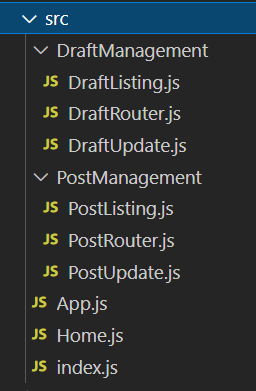
With this approach, we can now enjoy the ff. benefits:
- If we need to change a module's root path, we just need to change it in one place, in the `App` component.
- If we need to remove/disable a module, we can simply remove its routing configuration from the `App` component.
- The routes are easier to maintain since each module has its own configuration.
Anyway, I hoped you learned something new from me today. Let me know your thoughts in the comments!
---
Hey, you! Follow me on [Twitter](https://twitter.com/projectkenneth)!